Fake Alert
A fake alert is a scam pop-up or message meant to scare you into acting fast—like calling fake support, downloading malware, or paying for bogus services.
What Is a Fake Alert?
A fake alert is a fraudulent warning—often displayed as a pop-up, notification, or full-screen message—designed to scare you into taking immediate action, such as calling a fake support number, downloading malicious software, or paying for unnecessary services.
What This Looks Like in Real Life
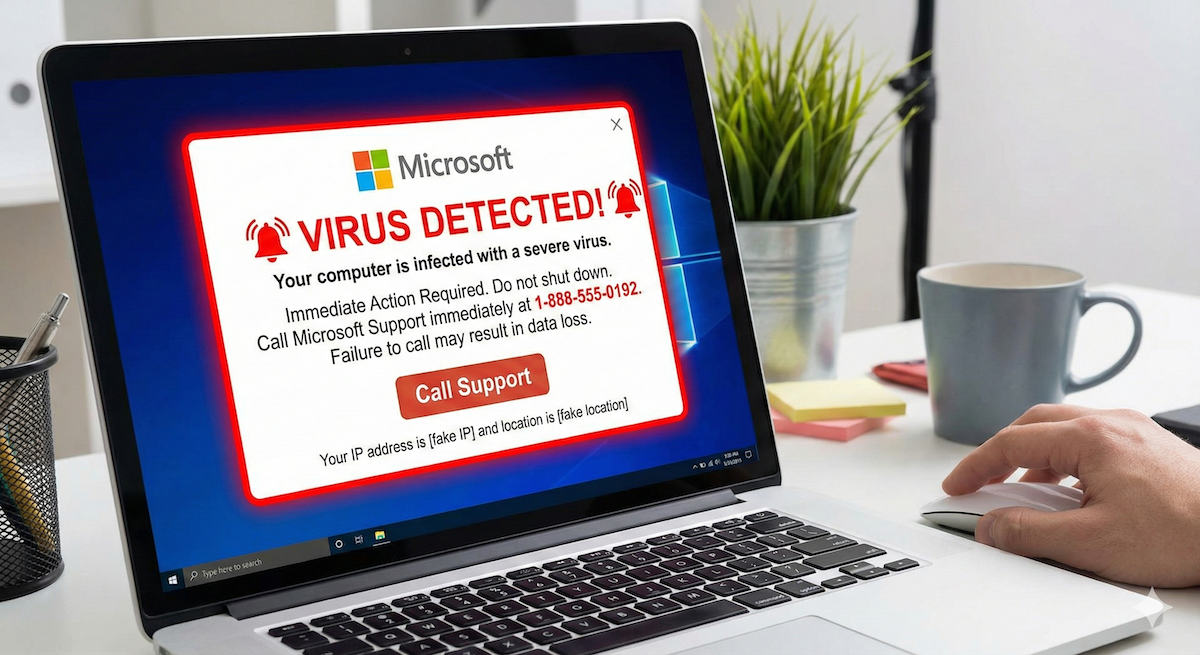
You're browsing the internet when suddenly a loud alarm sounds and a full-screen warning appears claiming your computer is infected with a virus. The message urges you to call a toll-free number immediately or risk losing all your files. The alert may display a Microsoft, Apple, or antivirus company logo to appear legitimate. In reality, it's a scam designed to frighten you into action.
Common Types of Fake Alerts
- Fake virus warnings: Pop-ups claiming your device is infected and urging you to call for support or download software
- Fake security notifications: Alerts mimicking Windows, macOS, or antivirus programs warning of threats
- Browser lock scams: Messages that freeze your browser and claim illegal activity has been detected
- Fake update alerts: Prompts to download urgent "security updates" that are actually malware
- Fake subscription expiration: Warnings that your antivirus or security software has expired
- Fake delivery or account alerts: Notifications about packages or accounts requiring immediate action
How Fake Alert Scams Work
Fake alert scams usually follow a pattern tht you can recognize if you know what to look for. Remember, scammers use urgency to try to take you to take action quickly, so be sure to pause when you see something that doesn't feel right.
- Trigger: You visit a compromised website, click a malicious ad, or encounter a phishing link
- Scare: A dramatic warning appears with alarming language, flashing colors, or audio alerts
- Trap: The alert is designed to be difficult to close, creating panic
- Action: You're directed to call a phone number, download software, or enter payment information
- Exploitation Scammers gain remote access to your device, install malware, or steal your money
Warning Signs of a Fake Alert
- Pop-ups that appear suddenly while browsing, especially on unfamiliar sites
- Alerts that won't close or keep reappearing
- Urgent language like "Your computer is infected!" or "Call immediately!"
- Phone numbers displayed prominently in the warning
- Requests to download software or grant remote access
- Poor grammar, spelling errors, or mismatched logos
- Audio alarms or voice messages designed to create panic
- Claims that your files will be deleted or your computer will be locked
- Alerts asking for payment via gift cards, wire transfer, or cryptocurrency
How to Respond to a Fake Alert
If you see a suspicious pop-up:
- Do not click any buttons on the alert, including "Cancel" or "X" buttons within the pop-up
- Do not call any phone numbers displayed
- Close your browser using Task Manager (Windows: Ctrl+Alt+Delete) or Force Quit (Mac: Command+Option+Escape)
- Disconnect from the internet if the alert persists
- Clear your browser cache and cookies after closing
- Run a scan with legitimate, updated antivirus software
- Check for and remove any unfamiliar browser extensions
If you already interacted with the alert:
- Disconnect your device from the internet immediately
- If you granted remote access, assume your device is compromised
- Run a full antivirus scan and consider professional help
- Change passwords for sensitive accounts from a different device
- Monitor your bank and credit card statements for unauthorized charges
- If you made a payment, contact your bank or credit card company immediately
How to Protect Yourself
- Keep your browser and operating system updated
- Use a reputable ad blocker to reduce exposure to malicious ads
- Install legitimate antivirus software and keep it current
- Be cautious when clicking links or visiting unfamiliar websites
- Remember that real security warnings never ask you to call a phone number
- Legitimate companies like Microsoft and Apple do not display pop-ups demanding immediate payment
- Enable pop-up blockers in your browser settings
- You can also use a free scam checker like Scamwise to review questionable messages or pop-ups before acting
FAQs
What is a fake alert?
A fake alert is a fraudulent warning—often a pop-up or notification—designed to scare you into calling a fake support number, downloading malicious software, or paying for unnecessary services.
How can I tell if a security alert is fake?
Warning signs include pop-ups that won't close, urgent language demanding immediate action, phone numbers to call, requests for payment or remote access, and alerts that appear while browsing unfamiliar websites.
What should I do if I see a fake alert?
Do not click anything on the alert. Close your browser using Task Manager or Force Quit, clear your browser cache, and run a scan with legitimate antivirus software. Never call phone numbers displayed in pop-ups.